
Email Deliverability in a Shared Hosting Environment — SPF, DKIM, DMARC and rDNS with Web-CP
Shared hosting environments carry a specific deliverability risk that VPS operators and dedicated server administrators rarely talk about honestly: the IP reputation of your mail server is shared across every tenant sending from that address space. One abusive sender on the same subnet can damage inbox placement for every other domain on the server. Managing email deliverability in this context is not simply a DNS configuration task — it is an ongoing operational discipline that begins at the control panel layer.
This article covers the complete deliverability stack for a Web-CP-managed server: SPF record structure, DKIM key generation and signing configuration, DMARC policy deployment, and reverse DNS setup. Each section includes the actual configuration syntax and the failure modes that explain why most self-hosted mail ends up in spam.
Why Mail Fails — The Deliverability Stack
The major receiving services — Gmail, Outlook, Yahoo, Apple Mail — evaluate inbound mail through a sequence of checks that are individually binary (pass/fail) but collectively probabilistic. A message that fails one check lands in spam. A message that fails three arrives in the spam folder of a recipient who will never see it.
The checks, in the order a receiving MTA performs them:
PTR / rDNS — does the sending IP have a reverse DNS record, and does that record resolve forward to the same IP?
SPF — is the sending IP authorized to send mail for the domain in the
From:header?DKIM — is the message signed with a private key matching the public key published in DNS?
DMARC — does the SPF and/or DKIM result align with the
From:domain, and what should the receiver do if it doesn't?
Passing all four is the minimum bar for reliable inbox placement in 2026. Passing three is insufficient. MTA-STS and BIMI are the next layer, but they have no value if the first four are not solid.
Reverse DNS — The Layer Most Hosting Panels Ignore
PTR records are set at the IP level, not the domain level. In a Web-CP environment, this means the PTR record for the server's primary outbound IP must be configured at the datacenter or IP provider level — not through Web-CP's DNS manager, which only manages forward zones.
The correct setup requires two matching records:
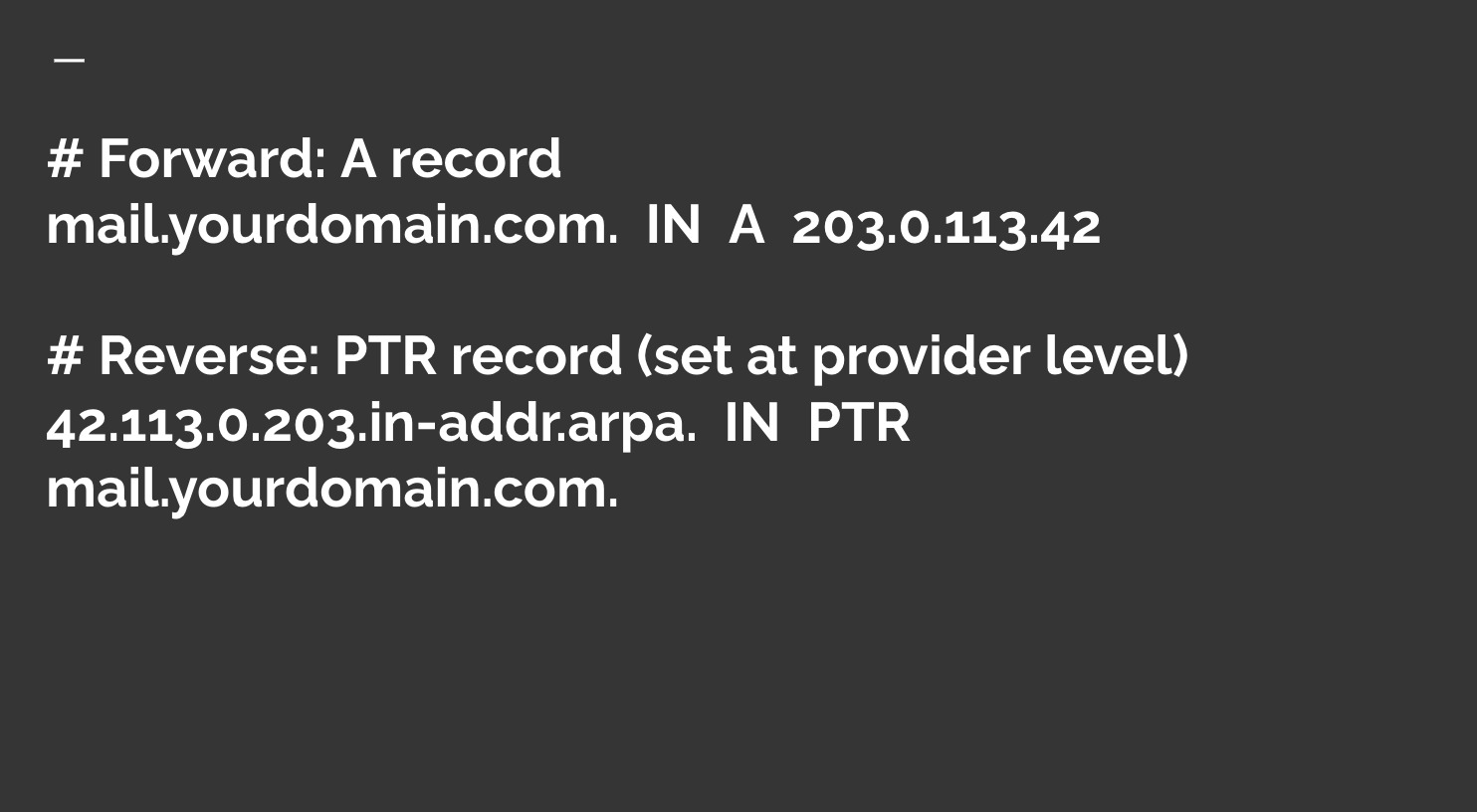
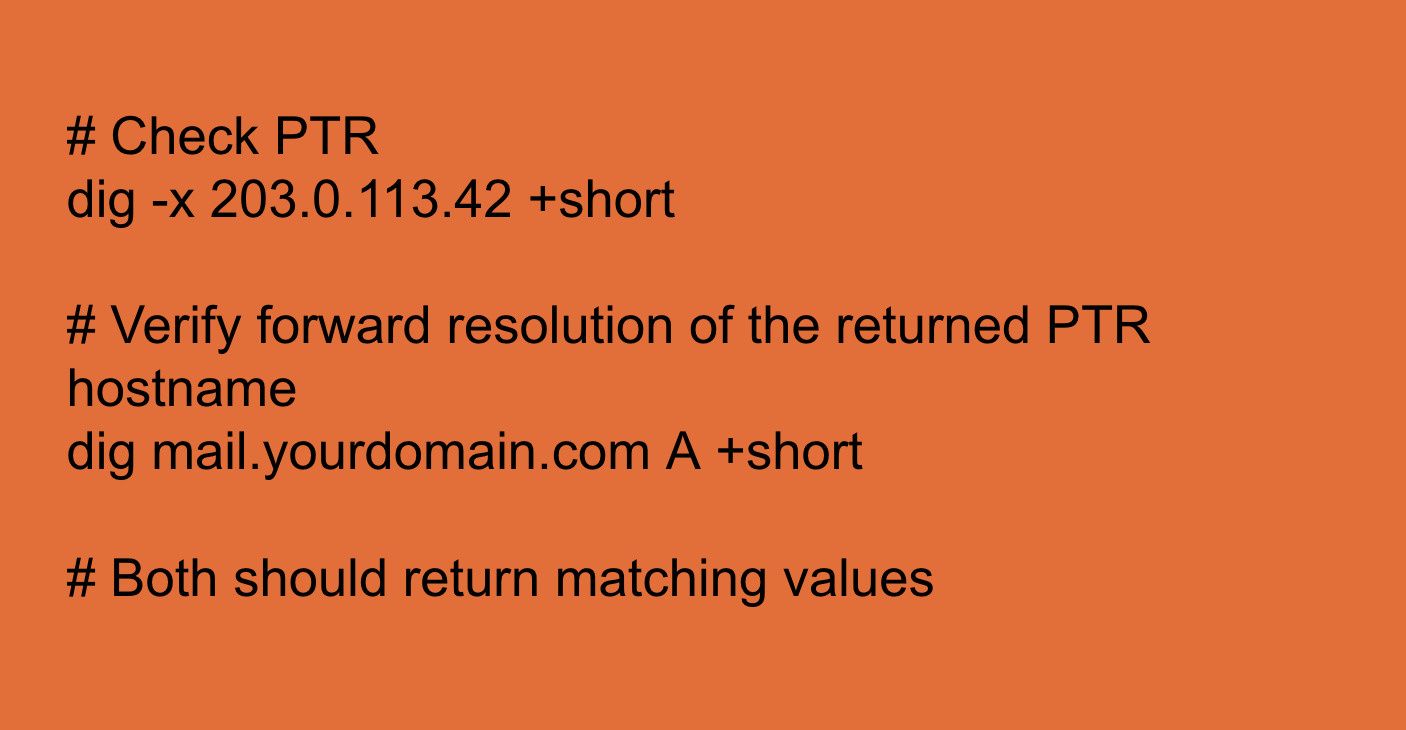
The PTR hostname must resolve forward to the same IP. Receiving MTAs perform a double-lookup: PTR → forward A → compare to connecting IP. Any mismatch fails the check.
Common failure mode in shared hosting: the hosting provider sets the PTR record to a generic hostname like server42.datacenter.example.com rather than a domain-specific record. The forward lookup of that hostname does not resolve to the sending IP, and the rDNS check fails silently. Most control panels, including Web-CP, do not surface this configuration through the panel UI — the administrator must contact the provider or use the datacenter's IP management interface directly.
Verification:
SPF — Authorizing Senders at the DNS Layer
SPF (Sender Policy Framework) is a DNS TXT record that specifies which IP addresses and hostnames are authorized to send mail for a given domain. A receiving MTA checks whether the IP that delivered the message is listed in the SPF record for the envelope sender's domain.
The record syntax, deployed through Web-CP's DNS editor:
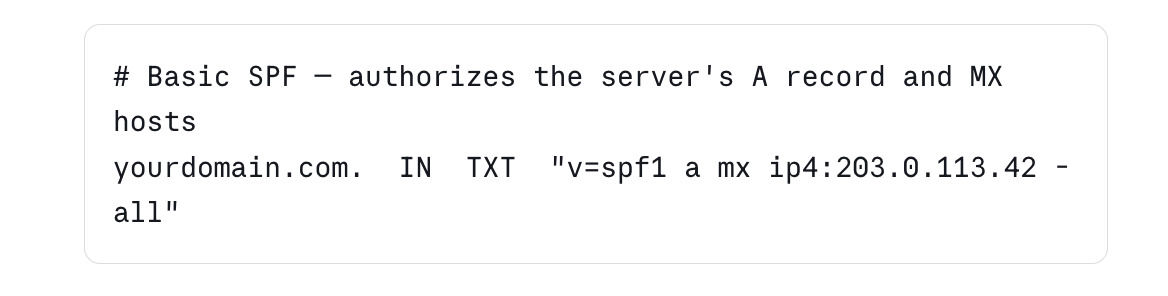
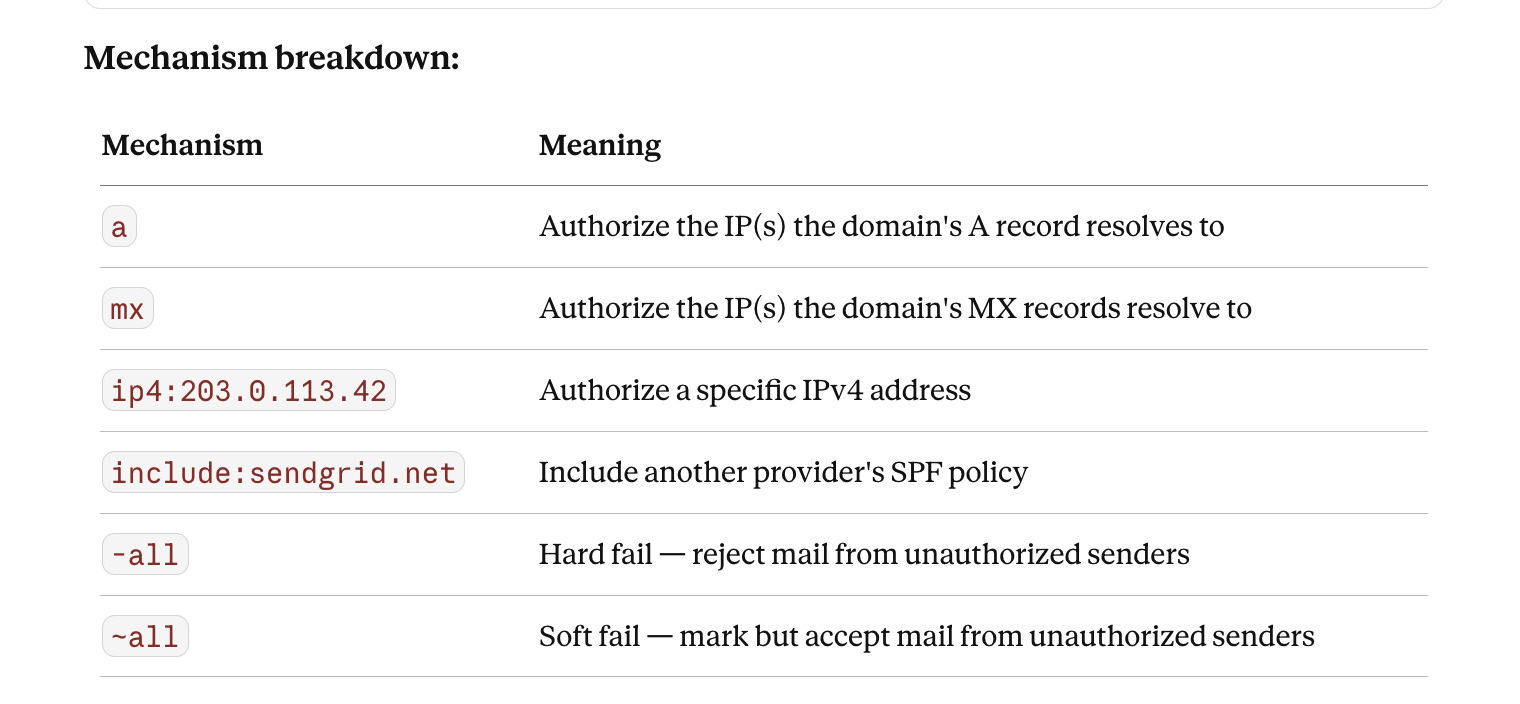
The -all vs ~all decision: Use -all (hard fail) for domains that send mail exclusively from known infrastructure. Use ~all (soft fail) during initial deployment when you are not yet certain all legitimate senders are accounted for, then migrate to -all once the sending infrastructure is mapped.
Critical limit: An SPF record may trigger no more than 10 DNS lookups during evaluation. Each include:, a, and mx mechanism that requires a DNS lookup counts toward this limit. Exceeding it causes a permerror result, which receiving MTAs treat as a failure. Domains with complex sending infrastructures frequently hit this limit — use SPF flattening tools to resolve it.
Verification:
# Query SPF record
dig yourdomain.com TXT +short | grep spf
# Test with a message header analyzer after sending a test message
# Google Postmaster Tools and MXToolbox both surface SPF results
DKIM — Cryptographic Signing at the Message Layer
DKIM (DomainKeys Identified Mail) signs outbound messages with a private key and publishes the corresponding public key as a DNS TXT record. Receiving MTAs retrieve the public key and verify the signature against the message headers and body.
Step 1: Generate a key pair on the server
# Generate a 2048-bit RSA key pair
openssl genrsa -out /etc/postfix/dkim/yourdomain.com.private 2048
openssl rsa -in /etc/postfix/dkim/yourdomain.com.private \
-pubout -out /etc/postfix/dkim/yourdomain.com.public
# Set permissions — private key must not be world-readable
chmod 600 /etc/postfix/dkim/yourdomain.com.private
chown postfix:postfix /etc/postfix/dkim/yourdomain.com.private
Step 2: Configure OpenDKIM or amavisd-new
# /etc/opendkim.conf — minimal production configuration
Domain yourdomain.com
KeyFile /etc/postfix/dkim/yourdomain.com.private
Selector mail2026
Socket inet:12301@localhost
Canonicalization relaxed/simple
Mode sv
SubDomains no
The Selector value (here mail2026) is arbitrary but must match the DNS record name exactly. Using a year-based selector makes rotation schedules auditable.
Step 3: Publish the public key in DNS
Extract the public key content and create a TXT record through Web-CP's DNS manager:

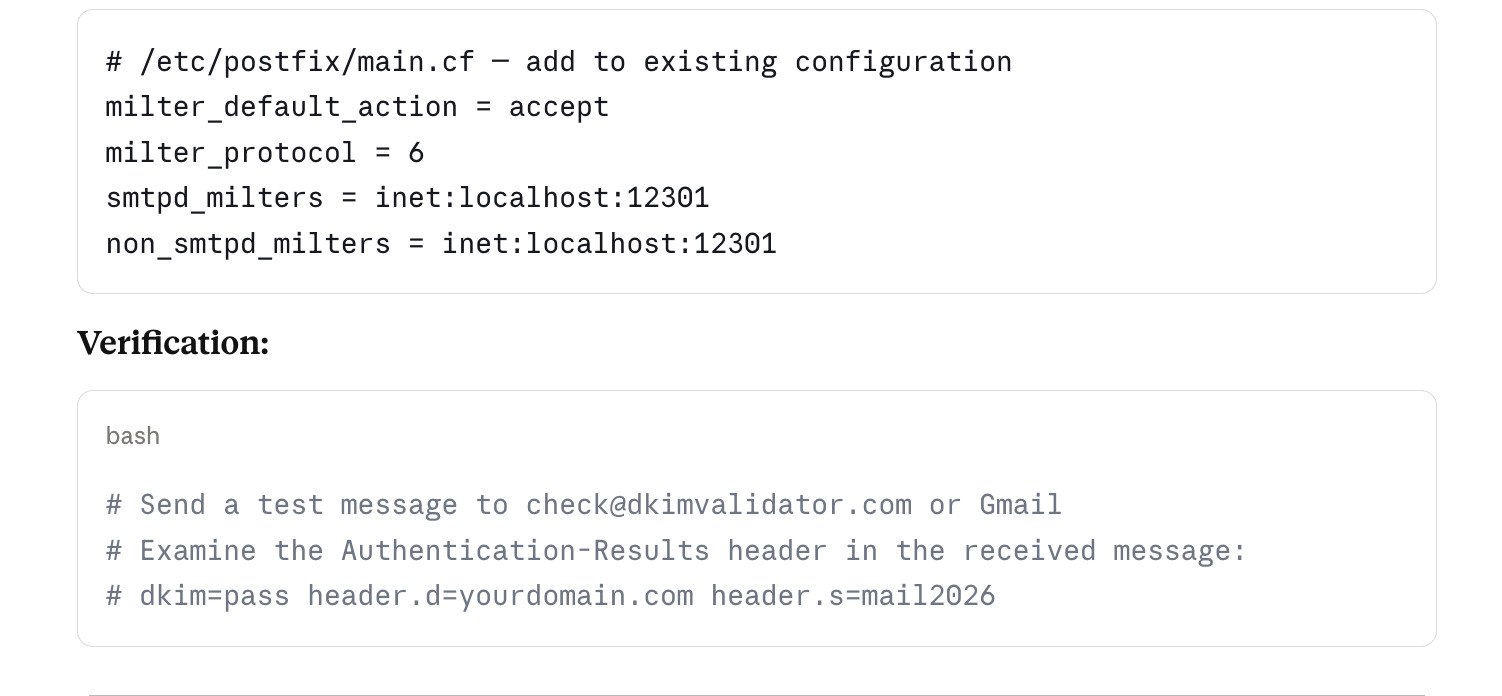
DMARC — Policy Enforcement and Reporting
DMARC (Domain-based Message Authentication, Reporting and Conformance) ties SPF and DKIM together by requiring that at least one passes with identifier alignment — meaning the domain in the passing check matches the From: header domain.
A DMARC record is a DNS TXT record at _dmarc.yourdomain.com:
# Monitoring policy — collect reports, take no action
_dmarc.yourdomain.com. IN TXT "v=DMARC1; p=none; rua=mailto:dmarc@yourdomain.com; ruf=mailto:dmarc@yourdomain.com; fo=1"
# Quarantine policy — move failing messages to spam
_dmarc.yourdomain.com. IN TXT "v=DMARC1; p=quarantine; pct=50; rua=mailto:dmarc@yourdomain.com"
# Reject policy — discard failing messages at the MTA level
_dmarc.yourdomain.com. IN TXT "v=DMARC1; p=reject; rua=mailto:dmarc@yourdomain.com"
Deployment sequence: Start with p=none for at least two weeks, collecting reports. Aggregate reports (rua) arrive daily from major receivers and show which messages passed and failed. Once you have confirmed that all legitimate sending infrastructure passes both SPF and DKIM with alignment, move to p=quarantine with pct=10 (apply the policy to 10% of failing mail), then increase gradually to pct=100, then move to p=reject.
Moving directly to p=reject without a monitoring period is a reliable way to stop your own mail from being delivered.
DMARC alignment modes:
SPF alignment: The domain in the
MAIL FROM(envelope sender) must match theFrom:header domainDKIM alignment: The
d=value in the DKIM signature must match theFrom:header domainStrict vs. relaxed: Strict alignment requires exact domain match; relaxed alignment permits organizational domain matches (subdomain passes for the parent domain)
The Multi-Domain Complexity in Web-CP Environments
In a Web-CP reseller or server administrator context, each domain account may have its own mail configuration. The deliverability controls above apply per domain, which means:
Each domain needs its own SPF record reflecting its specific sending infrastructure
Each domain needs its own DKIM key pair and selector — sharing keys across domains is a security risk and breaks per-domain key rotation
Each domain needs its own DMARC record and its own reporting address
Web-CP's domain control panel provides the DNS editor through which SPF and DMARC records can be deployed per domain. DKIM key generation and OpenDKIM configuration require server-level access, which is handled through the server control panel or direct SSH.
For hosting providers managing hundreds of domains, automation is the correct approach. A shell script that generates DKIM keys, writes the OpenDKIM key table entry, and outputs the DNS record value for each new domain reduces the per-domain setup time from thirty minutes to under two minutes and eliminates the transcription errors that account for a significant fraction of DKIM failures.
Ongoing Deliverability Operations
The configuration above is a starting point, not a permanent state. Email deliverability requires ongoing attention:
Monitor Google Postmaster Tools — Google publishes domain reputation, IP reputation, spam rate, and authentication results for mail sent to Gmail addresses. Register your sending domain and primary sending IP. A spam rate above 0.10% triggers deliverability degradation. A rate above 0.30% triggers bulk filtering.
Rotate DKIM keys annually — Generate a new key pair, publish the new selector's public key in DNS, update the OpenDKIM configuration, allow 24–48 hours for DNS propagation, then switch the active selector and retire the old key. Keep the old DNS record live for 30 days to allow delayed messages to validate.
Audit SPF quarterly — Sending infrastructure changes over time. Third-party services, marketing platforms, and transactional email providers each require an include: mechanism in the SPF record. Each include: consumes lookup budget. Review the record every quarter and remove entries for services no longer in use.
Watch bounce rates and complaint rates — High bounce rates signal list hygiene problems, which damage IP reputation independently of authentication configuration. High complaint rates signal content or targeting problems. Both require operational intervention rather than DNS changes.