
Rate Limiting, Throttling and Tenant Isolation in Web-CP — Protecting Multi-Tenant Environments at the Apache Layer
One of the core challenges of multi-tenant shared hosting is resource competition. A single customer running an inefficient application, generating excessive traffic, or experiencing abnormal request volume can affect every other account on the same server. When shared hosting promises predictable performance across tenants, uncontrolled resource consumption becomes both an infrastructure issue and a service quality problem.
Web-CP’s architecture — built around separated administrative views for server management, resellers, domains, and individual accounts — creates a structured foundation for applying resource governance where it belongs. This article explores how resource controls can be implemented at the web server layer and integrated into a hosting workflow without exposing operational complexity to end users.
Understanding resource contention in shared hosting
Multi-tenant environments rarely fail all at once. More often, degradation begins in one subsystem and cascades outward.
A common bottleneck appears in the web server process layer. Apache maintains a finite pool of workers that handle incoming traffic. If a single hosted application receives unusually high request volume — whether from popularity spikes, poor optimisation, or malicious traffic — available workers become occupied. Other sites on the same machine begin responding slowly or returning unavailable errors despite functioning normally.
Database contention creates a similar effect. Shared database environments operate with global connection limits. Applications that fail to recycle connections efficiently or open excessive sessions can gradually consume available capacity. Once limits are reached, healthy applications experience failures unrelated to their own behaviour.
Network throughput introduces another risk. Without bandwidth policies, one customer serving large downloads or receiving sustained transfer volume can increase latency for neighbouring tenants.
Logging infrastructure is often overlooked but equally vulnerable. Excessive application errors or verbose logging can consume disk space and reduce visibility across the entire server environment.
The challenge is not simply restricting usage. It is isolating consumption in ways that preserve fairness without reducing operational flexibility.
Traffic shaping and delivery control
Traffic throttling introduces controlled response behaviour rather than unrestricted output.
Instead of allowing applications to deliver unlimited data streams per request, response delivery policies can be applied at the hosted domain level. These controls regulate how quickly content leaves the server and reduce the likelihood that a single customer consumes disproportionate bandwidth.
This becomes especially useful for download-heavy directories, media delivery environments, archive hosting, and publicly shared assets.
However, delivery shaping alone is not sufficient.
Bandwidth governance should be combined with connection awareness because limiting transfer speed per request does not automatically prevent high aggregate usage created through concurrency.
Within Web-CP, these rules fit naturally into domain-level hosting templates and can be inherited automatically during provisioning.
Apache mod_evasive — Connection Rate Limiting and DDoS Mitigation
mod_evasive monitors incoming request rates and blocks IPs that exceed configurable thresholds. It is a defensive control against HTTP flooding and application-layer DDoS attacks.
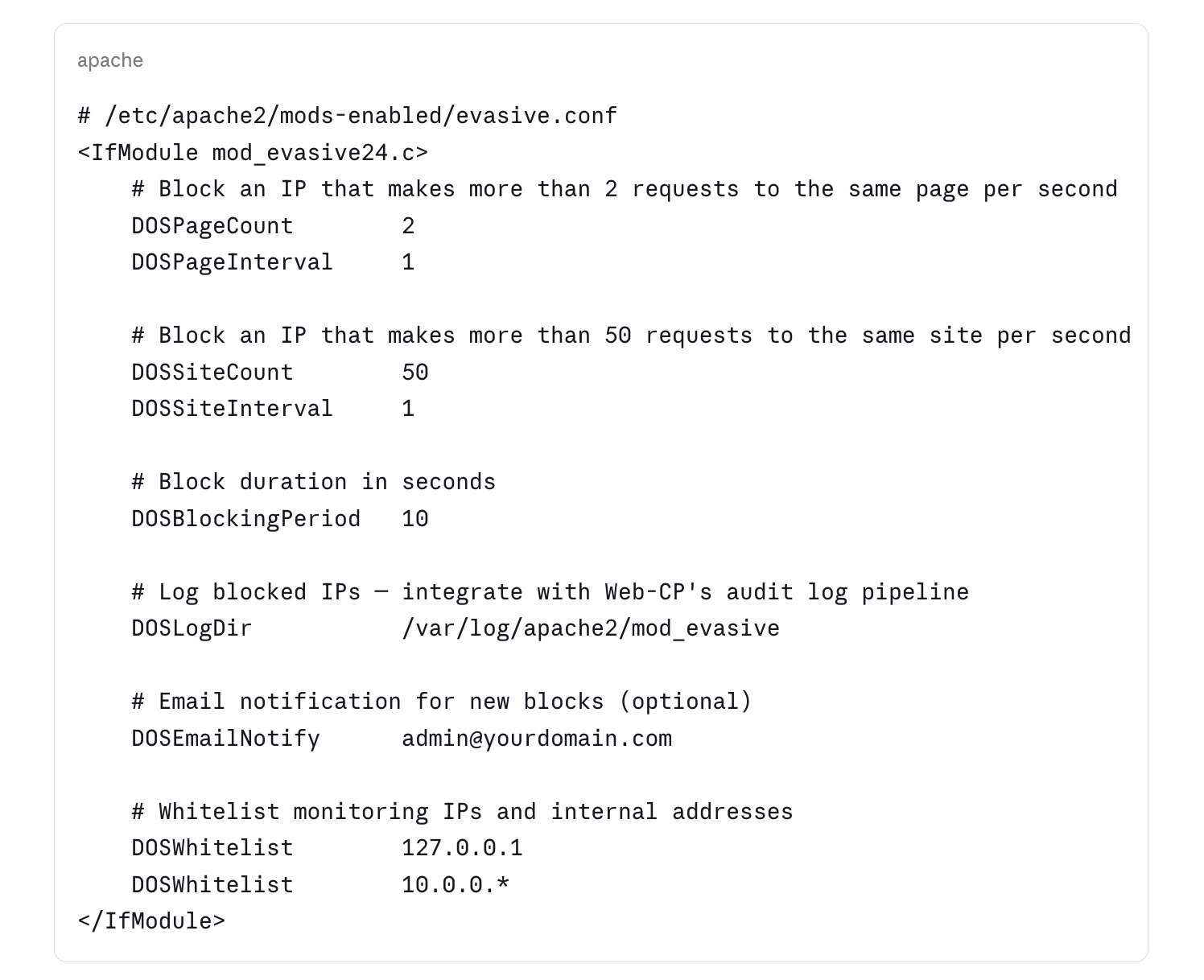
Tuning for shared hosting: The default thresholds in mod_evasive are appropriate for single-site servers but may produce false positives in multi-tenant environments where a single IP address may represent a NAT gateway serving many legitimate users. Tune DOSSiteCount upward (100–200) and DOSBlockingPeriod downward (5 seconds) for shared hosting to reduce false positive impact while still blocking sustained floods.
The tenant isolation implication: mod_evasive operates at the server level, not the tenant level. An IP blocked for excessive requests to tenant A is also blocked from accessing tenant B. In a hosting environment, this is usually the correct behavior — an IP conducting a HTTP flood is a server-level threat, not a single-tenant threat. Document this behavior in your terms of service.
Request limiting and defensive traffic controls
Traffic spikes do not always come from malicious sources.
Marketing campaigns, search indexing, software updates, or viral content can generate behaviour that resembles attack patterns.
Rate enforcement mechanisms monitor request frequency and temporarily restrict traffic when thresholds are exceeded.
In shared hosting environments this requires careful calibration. Policies that work for a dedicated single-site server often create false positives when multiple legitimate users appear behind shared network infrastructure.
An important architectural consideration is scope.
When excessive traffic protections operate at server level, actions taken against one source affect access across hosted domains. In practice this often aligns with operational reality because abusive request patterns threaten server stability rather than individual websites.
Clear documentation of this behaviour improves expectations and reduces support overhead.
Tenant isolation through separate application execution
The strongest form of isolation comes from separating application execution between customers.
Modern hosting environments increasingly avoid shared execution pools in favour of dedicated process groups assigned to each hosted account.
This approach creates several advantages.
A resource spike inside one application cannot consume execution capacity allocated elsewhere.
Memory pressure remains isolated.
Operational visibility improves because activity becomes attributable to a specific customer environment.
Security posture also improves because application boundaries reduce unintended access paths between hosted workloads.
Within Web-CP, account provisioning can automatically generate isolated runtime environments during domain creation so that separation exists from the beginning rather than being introduced later through migration.
Database governance and workload visibility
Database performance in shared environments depends less on raw capacity and more on predictability.
User-level connection policies reduce the likelihood that individual workloads monopolise available sessions.
At the same time, query monitoring becomes essential.
Long-running or inefficient database activity often reveals problems earlier than CPU or memory graphs.
Capturing execution patterns allows operators to identify expensive application behaviour before it affects neighbouring tenants.
This turns monitoring from a reactive support process into a preventative operational layer.
Web-CP environments benefit when these policies are attached directly to account creation rather than configured manually after onboarding.
Logging strategy as part of isolation design
Logging is frequently treated as operational housekeeping rather than infrastructure design.
In reality, uncontrolled log growth is one of the most common causes of instability in hosting systems.
Every hosted domain produces traffic records and application diagnostics. Under abnormal conditions, volume can increase dramatically.
A sustainable logging model separates tenant activity, rotates files automatically, limits retention windows, and prevents growth in one location from affecting core system availability.
When logs remain isolated, troubleshooting becomes faster and historical analysis remains usable.
The objective is not keeping everything forever. The objective is preserving visibility without allowing observability itself to become a resource consumer.
Turning isolation into a provisioning principle
Resource governance only becomes effective when applied consistently.
If isolation depends on manual decisions, exceptions accumulate and environments drift.
A more durable approach treats isolation as part of infrastructure creation.
Hosting templates define traffic behaviour.
Account creation generates isolated execution environments.
Database provisioning includes baseline controls.
Logging policies apply automatically.
This transforms resource protection from a maintenance activity into a standard characteristic of every new deployment.
Web-CP’s structure provides natural integration points for these workflows through templates, account provisioning hooks, and environment inheritance.
The broader lesson is simple.
Tenant isolation is rarely successful when introduced after growth begins. It becomes dramatically easier — and cheaper — when designed into the hosting platform from the start.